Making Bare-Metal Storage a First-Class Citizen in Miabi.io
Managing multiple disks, persistent volumes, and databases on bare-metal infrastructure with an open-source, self-hosted PaaS.
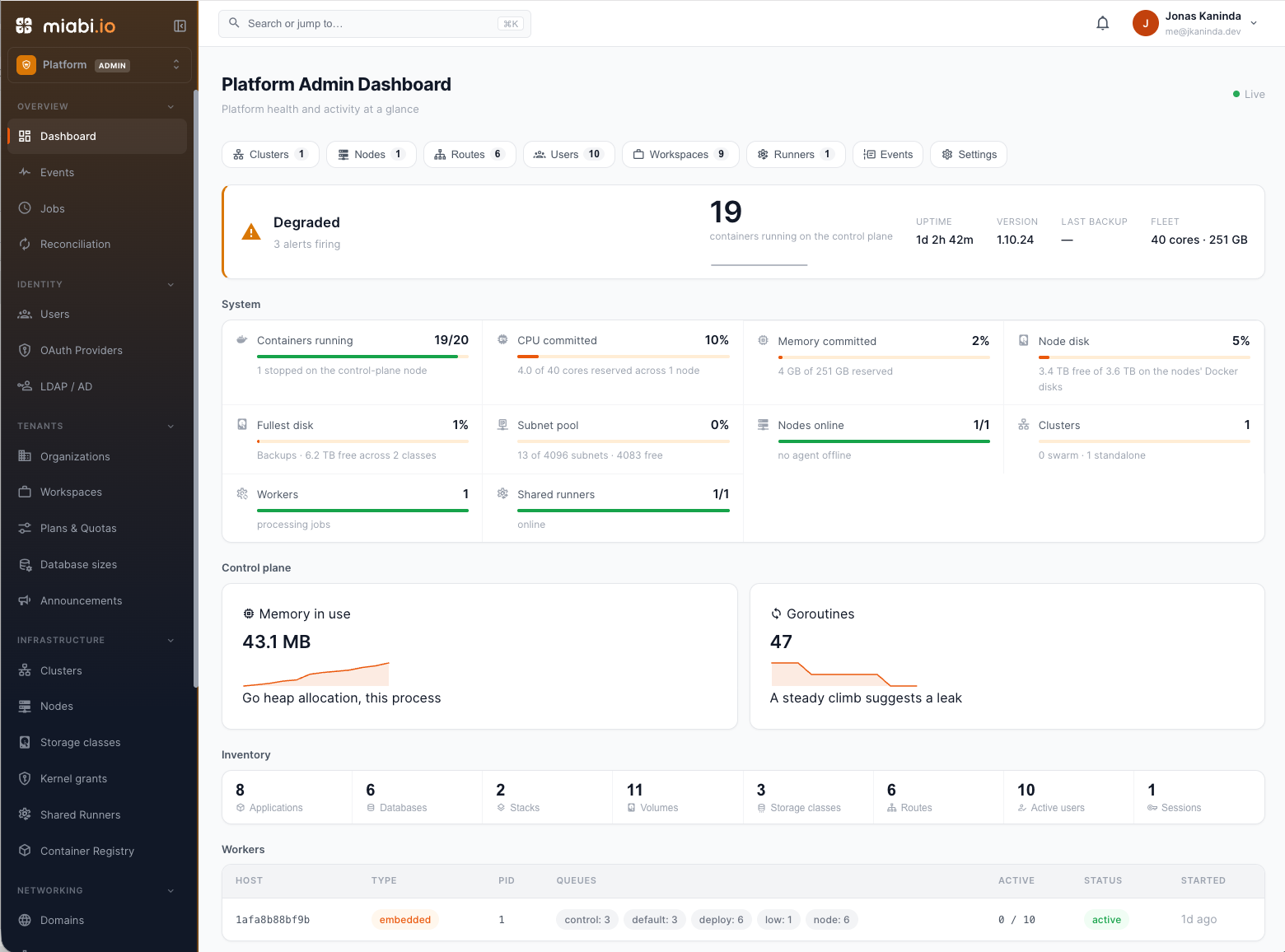
Managing multiple disks, application volumes, and databases without turning your dedicated server into a storage management headache.
A dedicated server can offer a lot more than just CPU and memory.
You might have a fast NVMe drive for performance-sensitive workloads, SSD storage for databases, and large HDDs for backups and persistent application data.
But having multiple disks is one thing. Making them useful to an application platform is another.
When running applications directly with Docker, storage management is relatively straightforward. You create volumes, mount directories, and let Docker handle the underlying storage.
That works well for individual deployments.
However, things become more complicated when you start managing multiple applications, databases, workspaces, and tenants on the same infrastructure.
Where should application data live? Which disk should host a database? How do you prevent tenants from accessing arbitrary host directories? What happens to the data when someone deletes a volume?
These are some of the problems I wanted to address when building Miabi.
That's why I introduced Storage Classes.
The problem with storage on bare-metal infrastructure
Most container platforms rely on Docker's default volume storage location.
On Linux, this is usually:
/var/lib/docker/volumes
This is convenient because Docker manages the volume lifecycle without requiring additional configuration.
But consider a dedicated server with multiple disks.
You might have:
- An operating system disk.
- A 4 TB SSD dedicated to backups.
- A 3 TB HDD for additional application data.
- Another NVMe drive for high-performance workloads.
By default, Docker doesn't know how you want to distribute your application data across these disks.
You could manually configure bind mounts, modify Docker's data root, or manage host directories yourself.
However, these approaches introduce operational complexity, particularly when building a multi-tenant platform.
Changing Docker's data-root is not a complete solution either. It moves Docker's entire data directory, including image layers and container data, to one location. It doesn't provide a way to distribute application volumes across multiple disks.
I wanted something more flexible.
Something that would allow infrastructure administrators to register storage locations once and let workspaces consume them through the platform.
Introducing Miabi Storage Classes
A storage class in Miabi is a registered directory on a node where the platform can create persistent volumes.
Instead of asking users to provide filesystem paths, administrators register storage classes and expose them to workspaces through their names.
For example:
| Storage class | Description | Mount path |
|---|---|---|
default |
Docker-managed storage | Docker data directory |
backups |
Dedicated SSD | /mnt/backups |
extra-data |
Additional HDD | /mnt/miabi-data |
ssd-fast |
High-performance storage | /mnt/ssd1/miabi |
The important distinction is that the platform administrator controls the physical storage configuration, while workspaces consume storage through logical names.
A workspace doesn't need to know where a directory is mounted on the host.
It only needs to know which storage class it is allowed to use.
This makes storage management considerably safer and more predictable in a multi-tenant environment.
Configuring storage on a real bare-metal server
I wanted to demonstrate this feature using actual hardware rather than a simulated environment.
My current Miabi deployment runs on a bare-metal dedicated server purchased from Contabo.
The server has separate disks configured for different purposes.
Here is how I organized them:
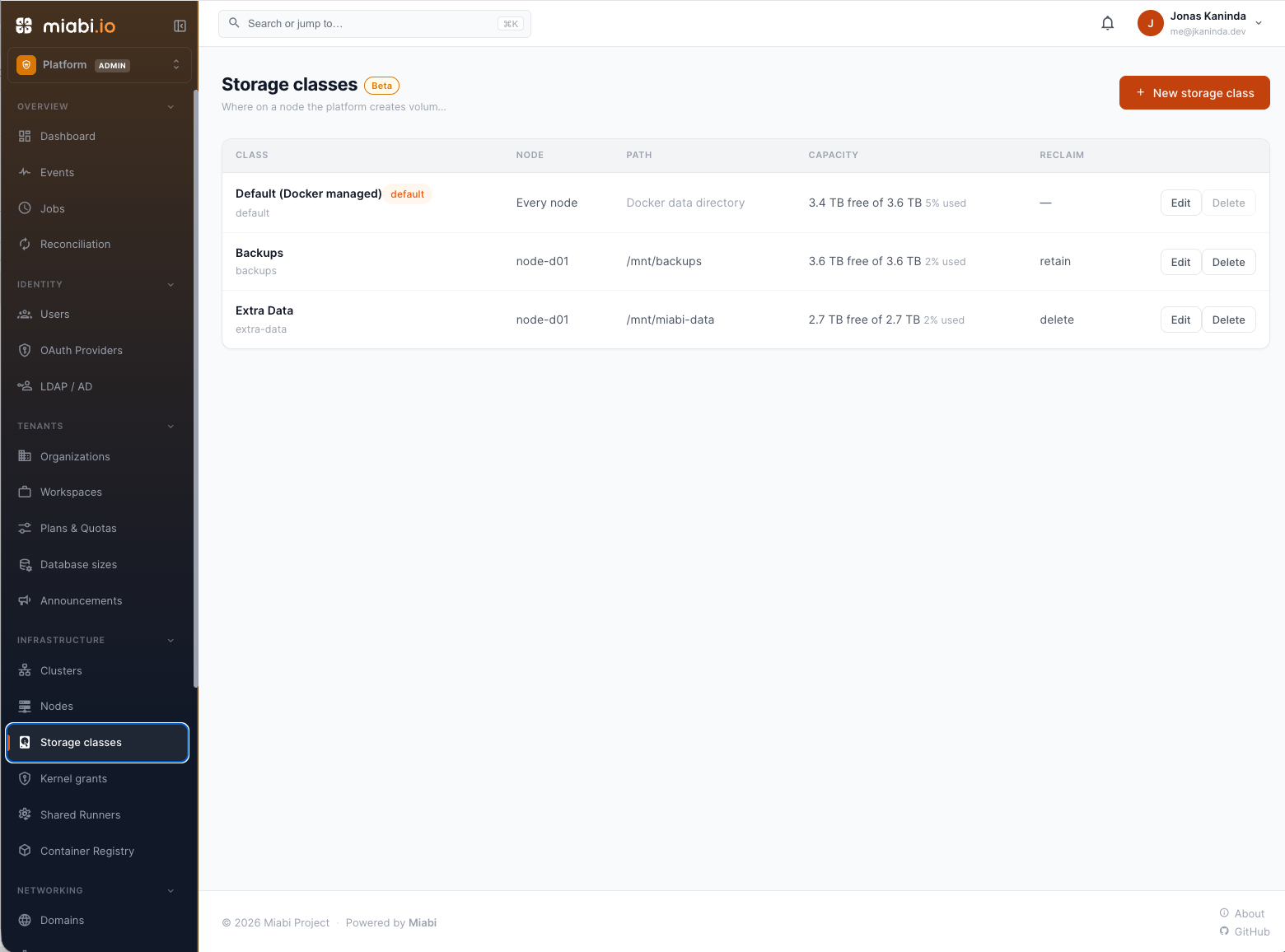
1. Default — Docker-managed storage
The default storage class uses Docker's existing data directory.
It is automatically available on every Miabi installation and provides backward compatibility with existing deployments.
Applications and volumes that don't explicitly select another storage class continue using the default configuration.
2. Backups — Dedicated SSD
I configured a separate 4 TB SSD mounted at:
/mnt/backups
This storage class is intended for data that needs a dedicated storage location.
3. Extra Data — Dedicated HDD
I also configured a 3 TB HDD mounted at:
/mnt/miabi-data
This provides additional capacity for persistent application data and managed databases.
Each storage class is registered against its corresponding Miabi node.
Once registered, Miabi validates that the directory exists on the node before accepting the configuration.
This is important because an incorrectly mounted disk shouldn't silently become a problem during someone's deployment.
Managing storage capacity and usage
Registering disks is only part of the problem.
Infrastructure administrators also need visibility into how those disks are being consumed.
Miabi provides capacity information for each storage class, including:
- Total filesystem capacity.
- Available storage.
- Space consumed by data belonging to the class.
- Other data occupying the same filesystem.
- The last capacity measurement.
Administrators can also open a storage class to inspect the volumes and databases using it.
For example, my current extra-data storage class shows:
- 2.7 TB total usable capacity.
- Approximately 2% usage.
- 11 volumes.
- 4 managed databases.
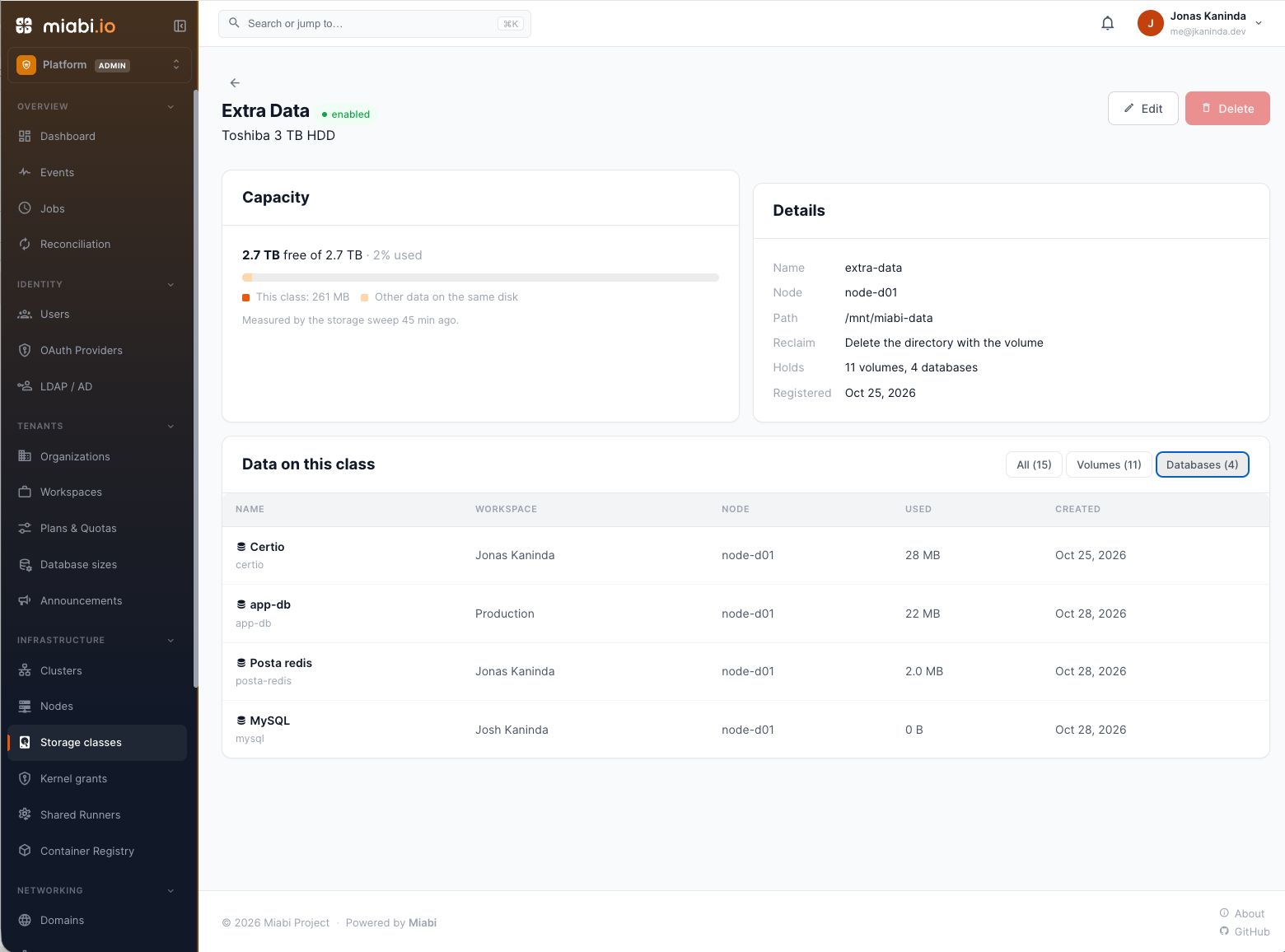
The detail page also identifies the workspace, node, storage usage, and creation date for each volume or database.
This makes it easier to understand where persistent data lives without manually inspecting directories on the server.
Capacity information is collected through Miabi's storage measurement process.
One important detail: this is capacity monitoring and accounting, not a hard filesystem quota. Actual storage enforcement depends on the underlying storage backend.
Choosing storage classes for application volumes
Storage classes are not just administrative metadata.
Workspaces can actually use them when creating persistent volumes.
When multiple storage classes are available to a workspace, the volume creation interface allows the user to select an appropriate class, subject to the workspace's plan.
Miabi also supports declaring storage classes directly in application manifests.
For example:
apiVersion: miabi.io/v1
kind: Volume
metadata:
  name: pgdata
spec:
  size: 20Gi
  storageClass: ssd-fast
This allows applications to declare their storage requirements without depending on the physical filesystem layout of a particular server.
The same manifest can be applied to different environments, even when their underlying storage configurations differ.
If no storage class is specified, Miabi resolves the appropriate default based on the workspace, plan, and node configuration.
Importantly, changing the storage class of an existing volume does not silently move its data. Storage migration must be handled explicitly to avoid accidental data loss.
Managed databases use storage classes too
Persistent storage isn't only about application volumes.
Managed databases also need predictable storage placement.
PostgreSQL, MySQL, MariaDB, Redis, MongoDB, and other database services need persistent data directories.
In Miabi, managed database instances use the same storage class infrastructure.
When creating a database, administrators or workspace users can select an available storage class through the console or API.
The database's data volume is then created on the selected storage class.
This provides a consistent storage management model across application volumes and managed databases.
For example, you could keep performance-sensitive database workloads on SSD storage while placing less demanding application data on a larger HDD.
Database storage placement is fixed at creation. Moving an existing database requires backing it up, creating a new instance on the desired storage class, and restoring the data.
Storage classes and multi-tenancy
One of the architectural decisions behind Miabi is that multi-tenancy should not be an afterthought.
A platform designed for multiple workspaces needs to control not only who can deploy applications, but also which infrastructure resources they can consume.
This is particularly important for shared hosting providers.
Imagine offering three different hosting plans:
- Basic: Access to standard storage.
- Professional: Access to standard storage and SSD storage.
- Premium: Access to all available storage classes.
Miabi allows administrators to configure storage class availability and default storage classes at the plan level.
Workspace-specific overrides are also supported.
This means infrastructure administrators can decide which storage resources are available to each customer without exposing host filesystem paths or giving tenants unrestricted access to the underlying server.
Storage becomes another infrastructure resource that can be managed through the platform's multi-tenant model.
Reclamation policies: What happens when a volume is deleted?
Another important aspect of persistent storage is lifecycle management.
Deleting a Docker volume doesn't necessarily remove the data stored on the filesystem.
Depending on how the volume was created, its underlying data can remain on disk.
Miabi introduces configurable reclamation policies for storage classes.
There are two options:
Delete
When a volume is deleted, its associated directory is also removed.
This is useful for ordinary application storage where the data should follow the volume lifecycle.
Retain
When a volume is deleted, its underlying directory is preserved.
This is useful when administrators need to retain data for manual recovery, inspection, or other operational purposes.
The policy is configured at the storage class level.
This gives infrastructure administrators control over what happens to persistent data when resources are removed.
Designed for real infrastructure, not just Docker deployments
Storage classes are one part of a broader architectural direction behind Miabi.
I'm building Miabi as an open-source, self-hosted Platform as a Service (PaaS) for dedicated servers, bare-metal infrastructure, and cloud virtual machines.
The idea is straightforward:
You shouldn't need to operate a full Kubernetes cluster just to manage multiple applications and databases on your own infrastructure.
Docker provides an excellent container runtime, but operating a platform on top of Docker requires additional capabilities.
You need application lifecycle management, networking, domains, TLS, persistent storage, databases, backups, deployment automation, resource management, and multi-tenancy.
Miabi brings these capabilities together behind a unified platform.
Storage Classes are an example of how I'm approaching this: keeping the underlying infrastructure flexible while providing a consistent experience to application developers and platform administrators.
The objective isn't to hide infrastructure completely.
It's to make infrastructure easier to operate, understand, and share.
What's next?
Storage management is an evolving part of Miabi.
As the platform grows, I want to continue improving how storage resources are managed across nodes and environments.
Multi-node deployments introduce additional challenges around filesystem availability, storage placement, and data lifecycle management.
These are important considerations as Miabi moves beyond individual dedicated servers toward larger infrastructure deployments.
For now, Storage Classes provide a foundation for managing multiple disks and persistent data in a more structured way.
And, importantly, this is running on actual bare-metal hardware.
Not everyone needs Kubernetes.
Sometimes, what you need is a practical platform that makes better use of the infrastructure you already own.
That's what I'm building with Miabi.
Explore Miabi
Miabi is open-source and self-hosted.
- Website: https://miabi.io
- Documentation: https://docs.miabi.io/docs/storage/storage-classes/
- GitHub: https://github.com/miabi-io/miabi
If you're running applications on dedicated servers or building your own hosting platform, I'd love to hear how you approach storage management.
About the author
I'm a Software Engineer passionate about building scalable systems and simplifying infrastructure through open source. With over 5 years of hands-on experience, I specialize in Go (Golang), Kotlin, Spring Boot, and Linux-based systems, with a strong DevOps foundation in Docker, Kubernetes, and CI/CD automation.
I'm the author of several open source tools, including:
- PG-BKUP – PostgreSQL backup and restore
- MYSQL-BKUP – MySQL backup and restore solution
- Goma Gateway – Declarative API Gateway and reverse proxy
- Okapi – Fast and extensible web framework in Go
My focus is on building developer-friendly tools that are lightweight, portable, and production-ready.
Areas of Focus:
- Cloud-native architecture & API design
- Developer tooling & platform engineering
- DevOps, GitOps, and SRE best practices
- Secure infrastructure & automation workflows
Open source is at the core of my work. I thrive in both independent and collaborative environments, always aiming for clean code, thoughtful design, and real-world impact.
Comments
Join the discussionNo comments yet. Be the first to comment.


